

'%20stroke-width='1.5'/%3e%3cg%20fill='%231be0c6'%3e%3cpath%20d='m32.25%2029h1.5v6h-1.5z'/%3e%3cpath%20d='m36%2033h-6l3%204z'/%3e%3c/g%3e%3c/svg%3e)
'%20stroke-width='1.5'/%3e%3cpath%20fill-rule='evenodd'%20clip-rule='evenodd'%20d='M35.125%2029H35V27.5H33.5V29H32.5V27.5H31V29H30.5H29V30.5V32.25V33.75V35.5V37H30.5H31V38.5H32.5V37H33.5V38.5H35V37H35.125C36.4367%2037%2037.5%2035.9367%2037.5%2034.625C37.5%2033.9964%2037.2558%2033.4248%2036.8571%2033C37.2558%2032.5752%2037.5%2032.0036%2037.5%2031.375C37.5%2030.0633%2036.4367%2029%2035.125%2029ZM30.5%2030.5H35.125C35.6082%2030.5%2036%2030.8918%2036%2031.375C36%2031.8582%2035.6082%2032.25%2035.125%2032.25H30.5V30.5ZM35.125%2033.75H30.5V35.5H35.125C35.6082%2035.5%2036%2035.1082%2036%2034.625C36%2034.1418%2035.6082%2033.75%2035.125%2033.75Z'%20fill='%231BE0C6'/%3e%3cdefs%3e%3clinearGradient%20id='paint0_linear_11576_70700'%20x1='23'%20y1='33'%20x2='43'%20y2='33'%20gradientUnits='userSpaceOnUse'%3e%3cstop%20stop-color='%231D56F5'/%3e%3cstop%20offset='1'%20stop-color='%2300B3F5'/%3e%3c/linearGradient%3e%3c/defs%3e%3c/svg%3e)
'%3e%3cpath%20d='m37.5%2019.3118v-2.644l-12.217-5.4178-1.1977.5312v24.7294l1.1977.5312%201.1977-.5311v-11.0169h3.2v-2.4433h-3.2v-8.604l5.7055%202.5191v17.0149l2.3953-1.0623v-14.8949z'/%3e%3cpath%20d='m15.7559%2015.475%203.3901%2011.0263v-12.5297l2.3954-1.0623v22.4732l-2.3954-1.0623v-.1142l-.1253.0386-3.5579-11.5721v10.0143l-2.3954-1.0623v-14.9572z'/%3e%3c/g%3e%3c/svg%3e)
'/%3e%3cpath%20d='M32.5%2034.4883H37.5'%20stroke='%231BE0C6'%20stroke-width='1.5'/%3e%3cdefs%3e%3clinearGradient%20id='paint0_linear_8794_15706'%20x1='27'%20y1='34.2943'%20x2='44.0549'%20y2='34.2943'%20gradientUnits='userSpaceOnUse'%3e%3cstop%20stop-color='%231D56F5'/%3e%3cstop%20offset='1'%20stop-color='%2300B3F5'/%3e%3c/linearGradient%3e%3c/defs%3e%3c/svg%3e)
'%20stroke-width='1.5'/%3e%3cpath%20d='M31%2031H39'%20stroke='%231BE0C6'%20stroke-width='1.5'/%3e%3cdefs%3e%3clinearGradient%20id='paint0_linear_1223_27506'%20x1='25'%20y1='39.5488'%20x2='37.8691'%20y2='17.1844'%20gradientUnits='userSpaceOnUse'%3e%3cstop%20stop-color='%233165F5'/%3e%3cstop%20offset='1'%20stop-color='%231DBBF5'/%3e%3c/linearGradient%3e%3c/defs%3e%3c/svg%3e)
'%20stroke-width='1.5'/%3e%3crect%20x='32'%20y='29.75'%20width='1.5'%20height='6'%20fill='%231BE0C6'/%3e%3cdefs%3e%3clinearGradient%20id='paint0_linear_26_143'%20x1='23'%20y1='41.5488'%20x2='35.8691'%20y2='19.1844'%20gradientUnits='userSpaceOnUse'%3e%3cstop%20stop-color='%233165F5'/%3e%3cstop%20offset='1'%20stop-color='%231DBBF5'/%3e%3c/linearGradient%3e%3c/defs%3e%3c/svg%3e)
'%20stroke-width='1.5'/%3e%3cpath%20d='M35.9611%2028H32.7286L29.9999%2033.76H32.2652L31.3974%2038L35.9999%2032.6323H32.9632L35.9611%2028Z'%20fill='%231BE0C6'/%3e%3cdefs%3e%3clinearGradient%20id='paint0_linear_6189_76518'%20x1='23'%20y1='41.5488'%20x2='35.8691'%20y2='19.1844'%20gradientUnits='userSpaceOnUse'%3e%3cstop%20stop-color='%233165F5'/%3e%3cstop%20offset='1'%20stop-color='%231DBBF5'/%3e%3c/linearGradient%3e%3c/defs%3e%3c/svg%3e) Get Started
Get Started'%20fill='url(%23paint0_linear_26_134)'/%3e%3cdefs%3e%3clinearGradient%20id='paint0_linear_26_134'%20x1='35.2581'%20y1='35.6239'%20x2='35.445'%20y2='33.3493'%20gradientUnits='userSpaceOnUse'%3e%3cstop%20stop-color='%233165F5'/%3e%3cstop%20offset='1'%20stop-color='%231DBBF5'/%3e%3c/linearGradient%3e%3c/defs%3e%3c/svg%3e) Tutorials
Tutorials'%20stroke-width='1.5'/%3e%3cpath%20d='M16%2033C16%2033%2018.5%2030%2024%2030C29.5%2030%2032%2033%2032%2033'%20stroke='%231BE0C6'%20stroke-width='1.5'/%3e%3cdefs%3e%3clinearGradient%20id='paint0_linear_3104_84810'%20x1='19'%20y1='26.3658'%20x2='28.5193'%20y2='13.6404'%20gradientUnits='userSpaceOnUse'%3e%3cstop%20stop-color='%233165F5'/%3e%3cstop%20offset='1'%20stop-color='%231DBBF5'/%3e%3c/linearGradient%3e%3c/defs%3e%3c/svg%3e) Expert Reviews
Expert Reviews'%20stroke-width='1.5'/%3e%3crect%20x='27'%20y='33'%20width='6'%20height='1.5'%20fill='%231BE0C6'/%3e%3cdefs%3e%3clinearGradient%20id='paint0_linear_1223_27321'%20x1='17.75'%20y1='37.9878'%20x2='20.3947'%20y2='37.8395'%20gradientUnits='userSpaceOnUse'%3e%3cstop%20stop-color='%233165F5'/%3e%3cstop%20offset='1'%20stop-color='%231DBBF5'/%3e%3c/linearGradient%3e%3c/defs%3e%3c/svg%3e)


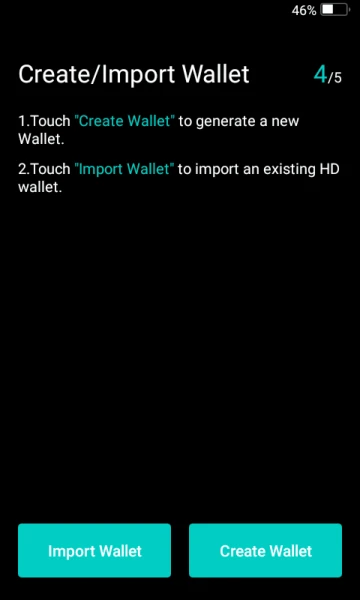
Step 5: Import or Create Wallet
Please follow the instructions on your Keystone device to create or import your wallet.
Please refer to this tutorial if you want to use Shamir Backup for your seed phrase.
Be sure to write down and store your seed phrase in secure locations. Any form of digital storage should be avoided. This includes taking photos, typing it in a mobile notebook application, or storing it in a password manager or any cloud storage services. NEVER share your seed phrase!
'/%3e%3crect%20x='18'%20y='59'%20width='44'%20height='1.5'%20fill='%2383868F'/%3e%3ccircle%20cx='29'%20cy='15'%20r='2'%20fill='%23E0516E'%20fill-opacity='0.24'/%3e%3ccircle%20cx='51'%20cy='15'%20r='2'%20fill='%23E0516E'%20fill-opacity='0.24'/%3e%3c/svg%3e)