

'%20stroke-width='1.5'/%3e%3cg%20fill='%231be0c6'%3e%3cpath%20d='m32.25%2029h1.5v6h-1.5z'/%3e%3cpath%20d='m36%2033h-6l3%204z'/%3e%3c/g%3e%3c/svg%3e)
'%20stroke-width='1.5'/%3e%3cpath%20fill-rule='evenodd'%20clip-rule='evenodd'%20d='M35.125%2029H35V27.5H33.5V29H32.5V27.5H31V29H30.5H29V30.5V32.25V33.75V35.5V37H30.5H31V38.5H32.5V37H33.5V38.5H35V37H35.125C36.4367%2037%2037.5%2035.9367%2037.5%2034.625C37.5%2033.9964%2037.2558%2033.4248%2036.8571%2033C37.2558%2032.5752%2037.5%2032.0036%2037.5%2031.375C37.5%2030.0633%2036.4367%2029%2035.125%2029ZM30.5%2030.5H35.125C35.6082%2030.5%2036%2030.8918%2036%2031.375C36%2031.8582%2035.6082%2032.25%2035.125%2032.25H30.5V30.5ZM35.125%2033.75H30.5V35.5H35.125C35.6082%2035.5%2036%2035.1082%2036%2034.625C36%2034.1418%2035.6082%2033.75%2035.125%2033.75Z'%20fill='%231BE0C6'/%3e%3cdefs%3e%3clinearGradient%20id='paint0_linear_11576_70700'%20x1='23'%20y1='33'%20x2='43'%20y2='33'%20gradientUnits='userSpaceOnUse'%3e%3cstop%20stop-color='%231D56F5'/%3e%3cstop%20offset='1'%20stop-color='%2300B3F5'/%3e%3c/linearGradient%3e%3c/defs%3e%3c/svg%3e)
'%3e%3cpath%20d='m37.5%2019.3118v-2.644l-12.217-5.4178-1.1977.5312v24.7294l1.1977.5312%201.1977-.5311v-11.0169h3.2v-2.4433h-3.2v-8.604l5.7055%202.5191v17.0149l2.3953-1.0623v-14.8949z'/%3e%3cpath%20d='m15.7559%2015.475%203.3901%2011.0263v-12.5297l2.3954-1.0623v22.4732l-2.3954-1.0623v-.1142l-.1253.0386-3.5579-11.5721v10.0143l-2.3954-1.0623v-14.9572z'/%3e%3c/g%3e%3c/svg%3e)
'/%3e%3cpath%20d='M32.5%2034.4883H37.5'%20stroke='%231BE0C6'%20stroke-width='1.5'/%3e%3cdefs%3e%3clinearGradient%20id='paint0_linear_8794_15706'%20x1='27'%20y1='34.2943'%20x2='44.0549'%20y2='34.2943'%20gradientUnits='userSpaceOnUse'%3e%3cstop%20stop-color='%231D56F5'/%3e%3cstop%20offset='1'%20stop-color='%2300B3F5'/%3e%3c/linearGradient%3e%3c/defs%3e%3c/svg%3e)
'%20stroke-width='1.5'/%3e%3cpath%20d='M31%2031H39'%20stroke='%231BE0C6'%20stroke-width='1.5'/%3e%3cdefs%3e%3clinearGradient%20id='paint0_linear_1223_27506'%20x1='25'%20y1='39.5488'%20x2='37.8691'%20y2='17.1844'%20gradientUnits='userSpaceOnUse'%3e%3cstop%20stop-color='%233165F5'/%3e%3cstop%20offset='1'%20stop-color='%231DBBF5'/%3e%3c/linearGradient%3e%3c/defs%3e%3c/svg%3e)
'%20stroke-width='1.5'/%3e%3crect%20x='32'%20y='29.75'%20width='1.5'%20height='6'%20fill='%231BE0C6'/%3e%3cdefs%3e%3clinearGradient%20id='paint0_linear_26_143'%20x1='23'%20y1='41.5488'%20x2='35.8691'%20y2='19.1844'%20gradientUnits='userSpaceOnUse'%3e%3cstop%20stop-color='%233165F5'/%3e%3cstop%20offset='1'%20stop-color='%231DBBF5'/%3e%3c/linearGradient%3e%3c/defs%3e%3c/svg%3e)
'%20stroke-width='1.5'/%3e%3cpath%20d='M35.9611%2028H32.7286L29.9999%2033.76H32.2652L31.3974%2038L35.9999%2032.6323H32.9632L35.9611%2028Z'%20fill='%231BE0C6'/%3e%3cdefs%3e%3clinearGradient%20id='paint0_linear_6189_76518'%20x1='23'%20y1='41.5488'%20x2='35.8691'%20y2='19.1844'%20gradientUnits='userSpaceOnUse'%3e%3cstop%20stop-color='%233165F5'/%3e%3cstop%20offset='1'%20stop-color='%231DBBF5'/%3e%3c/linearGradient%3e%3c/defs%3e%3c/svg%3e) Get Started
Get Started'%20fill='url(%23paint0_linear_26_134)'/%3e%3cdefs%3e%3clinearGradient%20id='paint0_linear_26_134'%20x1='35.2581'%20y1='35.6239'%20x2='35.445'%20y2='33.3493'%20gradientUnits='userSpaceOnUse'%3e%3cstop%20stop-color='%233165F5'/%3e%3cstop%20offset='1'%20stop-color='%231DBBF5'/%3e%3c/linearGradient%3e%3c/defs%3e%3c/svg%3e) Tutorials
Tutorials'%20stroke-width='1.5'/%3e%3cpath%20d='M16%2033C16%2033%2018.5%2030%2024%2030C29.5%2030%2032%2033%2032%2033'%20stroke='%231BE0C6'%20stroke-width='1.5'/%3e%3cdefs%3e%3clinearGradient%20id='paint0_linear_3104_84810'%20x1='19'%20y1='26.3658'%20x2='28.5193'%20y2='13.6404'%20gradientUnits='userSpaceOnUse'%3e%3cstop%20stop-color='%233165F5'/%3e%3cstop%20offset='1'%20stop-color='%231DBBF5'/%3e%3c/linearGradient%3e%3c/defs%3e%3c/svg%3e) Expert Reviews
Expert Reviews'%20stroke-width='1.5'/%3e%3crect%20x='27'%20y='33'%20width='6'%20height='1.5'%20fill='%231BE0C6'/%3e%3cdefs%3e%3clinearGradient%20id='paint0_linear_1223_27321'%20x1='17.75'%20y1='37.9878'%20x2='20.3947'%20y2='37.8395'%20gradientUnits='userSpaceOnUse'%3e%3cstop%20stop-color='%233165F5'/%3e%3cstop%20offset='1'%20stop-color='%231DBBF5'/%3e%3c/linearGradient%3e%3c/defs%3e%3c/svg%3e)


Step 4: Firmware Update
Requirements:
1. A MicroSD card in FAT32 format with a maximum memory capacity of 512GB.
2. Keystone battery level above 70%.
Steps:
1. Download the latest firmware. You can choose either the multi-coin firmware or the BTC-only one based on your needs. Please read this article for BTC-only firmware details.
Do note that you will not be able to revert and use the Multi-Coin firmware once you install and upgrade your Keystone device with the Bitcoin-Only firmware.
Please download your firmware update here if your device is already running the BTC-only firmware.
2. Unzip the downloaded package and copy the "update.zip" file to the root directory of your MicroSD card.
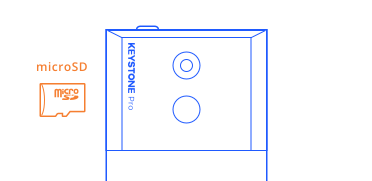
3. Insert the MicroSD card into your Keystone device and select “Upgrade”. If the auto-update window does not automatically pop up, please tap the 【Menu】icon, then【Settings】, then【Version】to update your device manually. If your MicroSD card isn’t recognized, it might not be in the correct FAT32 format. If so, please format your MicroSD card and try again.
'/%3e%3crect%20x='18'%20y='59'%20width='44'%20height='1.5'%20fill='%2383868F'/%3e%3ccircle%20cx='29'%20cy='15'%20r='2'%20fill='%23E0516E'%20fill-opacity='0.24'/%3e%3ccircle%20cx='51'%20cy='15'%20r='2'%20fill='%23E0516E'%20fill-opacity='0.24'/%3e%3c/svg%3e)